Edit Buttons
An object has a few ways to adjust the edit buttons. This page will document how and what you can do with it.
Disabling Colors
To disable colors, you need to make use of the Geometry Dash feature which considers the default main color ID set to 0 equal to no color. You can do this by setting the defaultMainColorID in ObjectTraits to 0. If both no color is enabled and no edit object callback is provided, the edit object button will be disabled.
Edit Special UI
You can enable the edit special button by providing a callback to editSpecial in ObjectInfo. This callback gets the currently selected objects of the object type being registered and returns a variant of either a self created geode::Popup* or a PopupConfig using the provided builder.
Edit Object UI
You can enable the edit special button by providing a callback to editObject in ObjectInfo. This callback gets the currently selected objects of the object type being registered and returns a variant of either a self created geode::Popup* or a PopupConfig using the provided builder.
Popup Config
To simplify the creation of popups, Object-Collab comes with a builder based popup config system. This system lets you set different kinds of menu templates and automatically positions them using the provided settings.
Info Popup
You can configure an information popup using the info method in the builder. This will take a configuration instance which provides the popup a title, description and node ID.
Menus
A menu allows you to easily configure arguments using a template. They can be set by either providing a constructed configuration to menu or a constructed ToggleMenu to either leftToggle or rightToggle. Any menu which takes in a value has the following 2 callbacks:
onValue(ValueUpdateCallback<const type&> callback): This applies the newly set value to the selection. It has the following utility methods to replicate vanilla behavior:applyValueToSelected(const Selected& selected, V T::* member, const V& value): Sets the value to the given member. If the member is a registered object property, update the property instead.applyValueToSelectedAndReport(const Selected& selected, V T::* member, const V& value, void (T::* reportMember)()): Sets the value to the given member. If the member is a registered object property, update the property instead. Afterwards report to the given method reference.
currentValue(CurrentValueCallback<type> callback): This gets the currently used value from the selections. It has the following utility method to replicate vanilla behavior:getCommonValueOrDefault(const Selected& selected, V T::* member): Gets the currently set value if all the objects in the selection have an equal value. Otherwise take the object property default if applicable or the type default.
| Menu Type | Behavior | Value Type |
|---|---|---|
| ToggleMenu | Configures a toggle menu which allows you to set a boolean value. | bool |
| NumericMenu | Configures a menu which handles any number input. This can be using arrows, a slider or an input. | float |
| InputMenu | Configures an input where any text can by typed. | std::string |
| EnumMenu | Configures an arrow menu with a predefined list of options. | std::string |
| CustomValueMenu | Configures a custom menu which is created using a provided factory callback. | N.A. |
| AxisLayoutMenu | Configures a Geode axis layout to position menus within. | N.A. |
An example:
ToggleMenu::builder()
    .id("toggle-id"_spr)
    .title("A toggle")
    .onValue([](bool value, const Selected& selected, geode::Popup* popup) {
        // Applies the new value to m_toggleMember of all the selected TriggerClass instances.
        // Afterwards it reports the change to the changeReportMethod method of the instance.
        applyValueToSelectedAndReport(selected, &TriggerClass::m_toggleMember, value, &TriggerClass::changeReportMethod);
    })
    .currentValue([](const Selected& selected, geode::Popup* popup) {
        // Returns the value all selected TriggerClass instances have in common.
        // If there's nothing in common, it will send back either false or the default value of the m_toggleMember object property.
        return getCommonValueOrDefault(selected, &TriggerClass::m_toggleMember);
    })
    .build()
Default Toggles
To simplify creating menus of configurable objects, Object-Collab provides 2 toggles to add some default Geometry Dash toggles to the leftToggles. These are:
triggerToggles: Adds the radio touch trigger and spawn trigger toggles which are applied to anEffectGameObject. If any of these are selected it will also add the multi trigger toggle.noMultiActivateToggle: Adds the no multi activate toggle which prevents anEnhancedGameObjectfrom activating more than once.
⚠️ If these toggles are used for the wrong base object type, they won’t work.
Positioning
The popup config comes with 3 explicit boxes where content can be positioned in. These are the menus, leftToggles & rightToggles. All these have a custom made table layout which is designed to fill a given axis and then overflow to the next available cross axis location. The toggle boxes are a column axis, the menus box is a row axis.
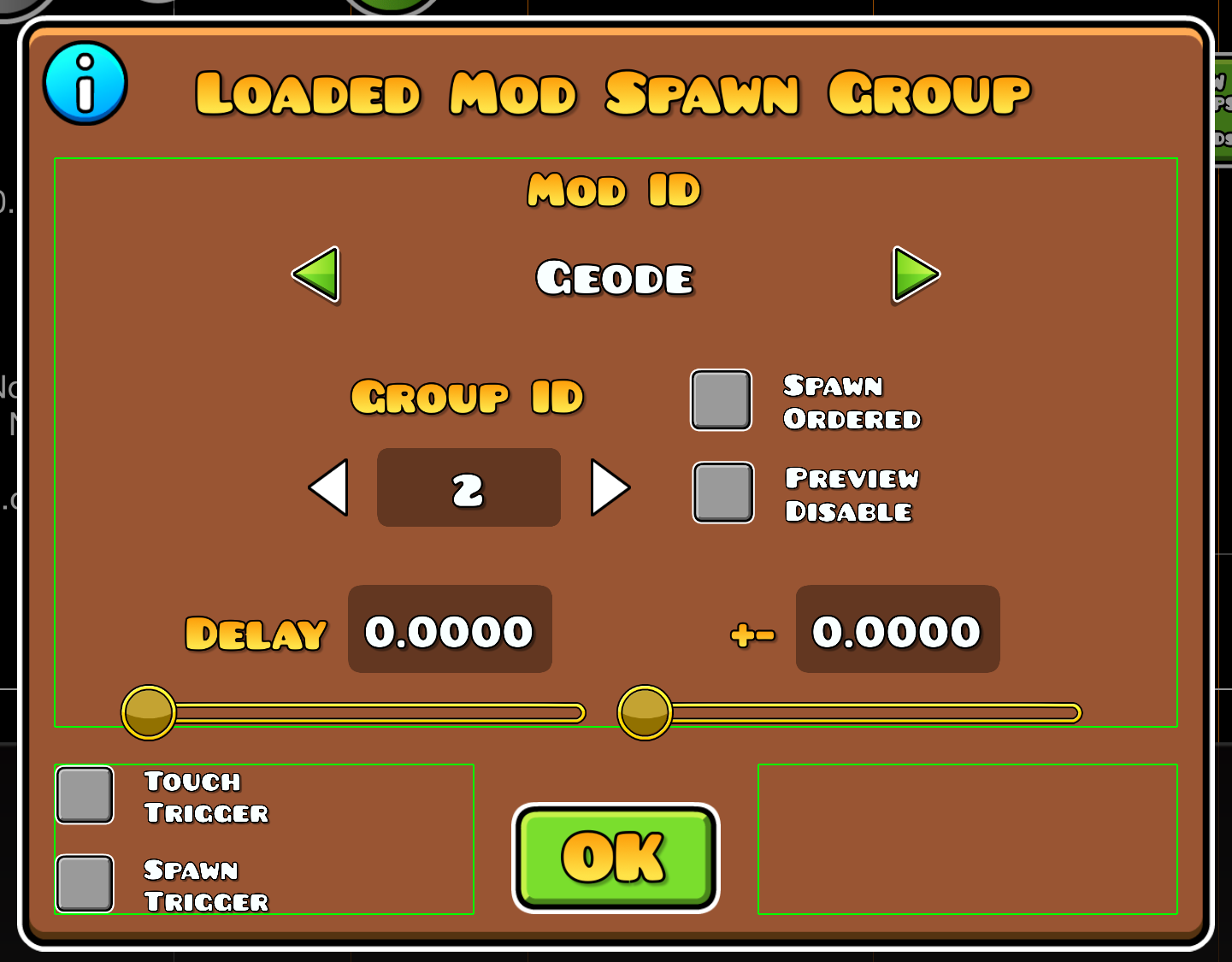
Example
#include <smjs.object-collab/include/object_collab.hpp>

using namespace object_collab::prelude;

PopupOptions ModSpawnTrigger::getEditObjectConfig(const Selected& selected) {
    return PopupConfig::builder()
        .width(320)
        .height(250)
        .gapY(20)
        .title("Loaded Mod Spawn Group")
        .info(InfoPopup::builder()
            .title("Help")
            .description("Works exactly like the spawn trigger with the condition that the targeted mod is installed & loaded.")
            .build())
        .triggerToggles(true)
        .menu(EnumMenu::builder()
            .id("mod-id"_spr)
            .title("Mod ID")
            .values(std::move(mods))
            .onValue([](const std::string& value, const Selected& selected, Popup* popup) {
                applyValueToSelectedAndReport(selected, &ModSpawnTrigger::m_mod, value, &ModSpawnTrigger::checkMod);
            })
            .currentValue([](const Selected& selected, Popup* popup) {
                std::string modID = getCommonValueOrDefault(selected, &ModSpawnTrigger::m_mod);

                return ModSpawnTrigger::getModName(std::move(modID));
            })
            .build())
        .menu(AxisLayoutMenu::builder()
            .axis(Axis::Row)
            .gap(20)
            .crossAxisAlignment(CrossAxisAlignment::Center)
            .menu(NumericMenu::builder()
                .id("group-id"_spr)
                .title("Group ID")
                .inputType(NumericMenu::InputType::Arrows)
                .min(0)
                .max(9999)
                .precision(0)
                .onValue([](const int value, const Selected& selected, Popup* popup) {
                    applyValueToSelected(selected, &ModSpawnTrigger::m_targetGroupID, value);
                })
                .currentValue([](const Selected& selected, Popup* popup) {
                    return getCommonValueOrDefault(selected, &ModSpawnTrigger::m_targetGroupID);
                })
                .build())
            .menu(AxisLayoutMenu::builder()
                .menu(ToggleMenu::builder()
                    .id("preview-disable"_spr)
                    .title("Preview\nDisable")
                    .onValue([](const bool value, const Selected& selected, Popup* popup) {
                        applyValueToSelected(selected, &ModSpawnTrigger::m_previewDisable, value);
                    })
                    .currentValue([](const Selected& selected, Popup* popup) {
                        return getCommonValueOrDefault(selected, &ModSpawnTrigger::m_previewDisable);
                    })
                    .build())
                .menu(ToggleMenu::builder()
                    .id("spawn-ordered"_spr)
                    .title("Spawn\nOrdered")
                    .onValue([](const bool value, const Selected& selected, Popup* popup) {
                        applyValueToSelected(selected, &ModSpawnTrigger::m_spawnOrdered, value);
                    })
                    .currentValue([](const Selected& selected, Popup* popup) {
                        return getCommonValueOrDefault(selected, &ModSpawnTrigger::m_spawnOrdered);
                    })
                    .build())
                .build())
            .build())
        .menu(AxisLayoutMenu::builder()
            .axis(Axis::Row)
            .gap(20)
            .menu(NumericMenu::builder()
                .id("delay"_spr)
                .title("Delay")
                .inputType(NumericMenu::InputType::Slider)
                .min(0)
                .max(1)
                .precision(4)
                .stepSize(0.0001)
                .onValue([](const float value, const Selected& selected, Popup* popup) {
                    applyValueToSelected(selected, &ModSpawnTrigger::m_spawnDelay, value);
                })
                .currentValue([](const Selected& selected, Popup* popup) {
                    return getCommonValueOrDefault(selected, &ModSpawnTrigger::m_spawnDelay);
                })
                .build())
            .menu(NumericMenu::builder()
                .id("+-"_spr)
                .title("+-")
                .inputType(NumericMenu::InputType::Slider)
                .min(0)
                .max(1)
                .precision(4)
                .stepSize(0.0001)
                .onValue([](const float value, const Selected& selected, Popup* popup) {
                    applyValueToSelected(selected, &ModSpawnTrigger::m_delayRange, value);
                })
                .currentValue([](const Selected& selected, Popup* popup) {
                    return getCommonValueOrDefault(selected, &ModSpawnTrigger::m_delayRange);
                })
                .build())
            .build())
        .build()
}